
What's the Best Software for a New Pressure Washing Business?
Last updated: November 2026
For a new pressure washing business, the best software is a short list that covers the jobs you’ll do every week in your first year: getting found, quoting house washes, driveways, and roofs the same way every time, following up on those quotes, keeping a customer list, taking card payments, and keeping your books. Scheduling, crew, and route-planning software can wait until your calendar is full or you hire help.
Most of that list is free or cheap. Spend first on the pieces that win jobs.
What do I actually need software for when I’m starting out?
In year one, your problem is winning jobs, not managing them. When an owner in a 2025 Pressure Washing Resource (PWR) thread on modernizing a business asked which software to get, one reply asked whether they had employees to dispatch or worked alone. They worked solo, so a big system was probably more than they needed.
Here’s the year-one checklist, in order:
Job | When you need it | What to look for |
|---|---|---|
A Google Business Profile listing | Before your first job | Free. Your service area, hours, and real photos of your work |
A business phone number | Before your first job | One you own, that can text, and that you can keep if you switch software |
Quoting | Your first quote | The same price every time, by phone, in person, and online, with your minimums and packages |
Follow-up | Your first quote | Reminders that go out on their own, and an alert when the customer opens the quote |
A customer list | Your first customer | Contact details and what you quoted and charged. Works on your phone and computer, and exports easily |
A card reader or payment app | Your first job | Takes cards on the spot and sends a receipt |
An accounting app | Your first job | Income, expenses, mileage, and receipts in one place, plus a separate business bank account |
Scheduling and invoicing software | When your phone calendar can’t keep up | Field-service software built for home-service work |
Dispatching, time tracking, and payroll | When you hire help | Only once someone besides you is on the schedule |
What can wait until later?
Anything that manages work you don’t have yet. Add field-service software for scheduling and invoicing once your phone calendar can’t keep up, crew tools when you hire, route planning when you’re driving between several jobs a day, and marketing tools like postcards once you have a customer list to use them on.
Can I start with pen and paper or a spreadsheet?
Yes, and plenty of owners do. One owner in the 2025 thread, who does a few jobs a week, many of them large, keeps customer details in a computer file and the rest on a paper calendar, sticky notes, and phone reminders.
The catch comes when you switch. In a 2024 PWR thread on getting organized, one owner said switching software would mean losing years of job records that show what they’d charged each customer.
So if you start on paper, keep one spreadsheet from day one, with a row for every quote:
- Customer name, address, phone, and email
- The service and the price you quoted
- Whether they said yes, and what you charged
- The date
- How they heard about you
Moving to software later is then an import, not a weekend of typing. And collect email addresses now: an owner in the 2025 thread said most customers, older ones included, use email.
Do I need a CRM on day one?
You need what a CRM holds: every customer and every quote, in one place you can reach from the truck. You don’t need dispatching and payroll when it’s just you. Owners disagree on the rest: in the 2025 thread, one said you’ll wish you’d started sooner, and another asked whether you need one at all.
Before you put your customer list anywhere, check three things:
- Can you get it out? A part-time owner in a 2025 PWR thread was on a free tool that stopped being free, and found they couldn’t export their contacts. Luckily, they had a backup.
- Does it work on every device? The 2024 owner had files scattered across a laptop, a desktop, and a phone. Web-based software keeps one copy you can open anywhere.
- Will you type everything twice? The part-time owner was tired of entering each contact twice, on their phone and in their software. Most of their business came by text, so texting mattered too.
What should quoting software do for a pressure washer?
Quoting is where a new owner wins or loses jobs, so get it right early. Look for software that:
- Prices from what customers know: house size and stories for a house wash, the size of a driveway or patio, and yes/no questions about heavy mildew, oil stains, or rust.
- Gives the same price every time, whether the customer calls, you’re in their driveway, or they’re on your website at night.
- Applies your minimum and trip charge, so small jobs still pay.
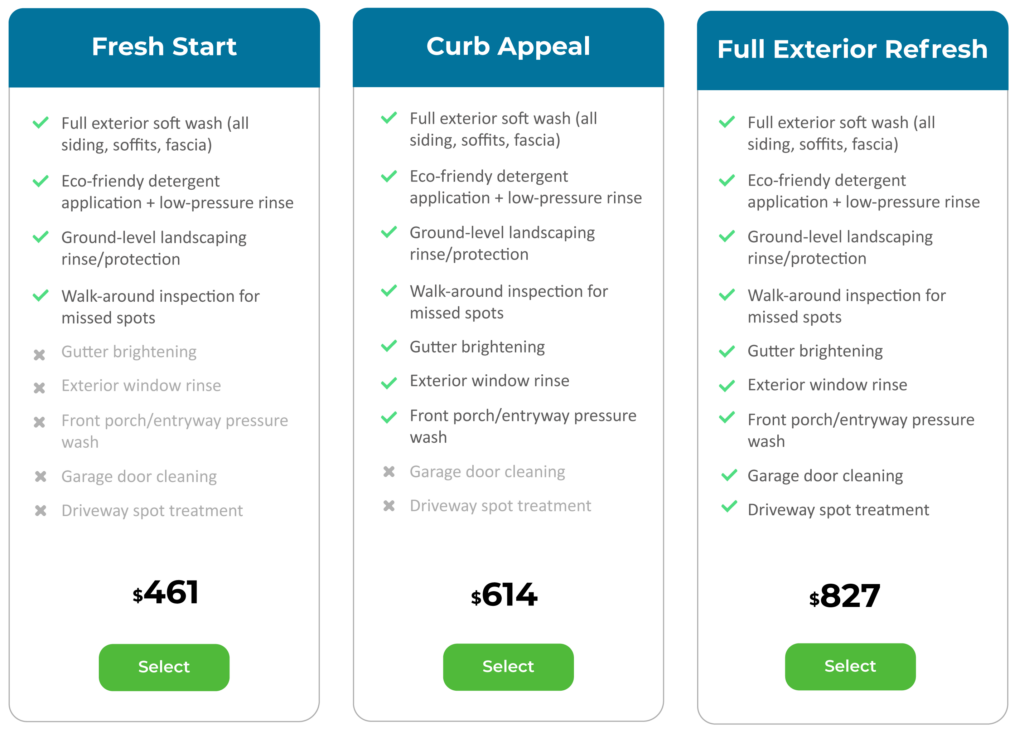
- Offers packages, like a house wash; a house wash with gutter brightening; or a house wash with gutters and windows. More in our guide to pricing packages and bundles.
- Lets you say “I need to see it first” for jobs you won’t price blind, like a badly stained deck.
- Follows up on its own and tells you when the customer opens the quote. More in How do I follow up on quotes that go unanswered?
- Saves every quote with the customer’s contact details.
For one simple service, a general form builder might do; our guide to instant online quotes covers when. And software won’t stop you from underquoting, as an owner in the 2025 thread warned, so work out how to price your jobs first.
How much should I spend on software in year one?
As little as you can until a tool pays for itself. A simple test: will it win you enough extra work, or save you enough time, to cover its cost each month? If not, it can wait.
- Start free where you can. The Google listing, a phone calendar, and a spreadsheet cost nothing.
- Pay first for what wins jobs: quick, consistent quotes and steady follow-up. Crew features don’t help until there’s a crew.
- Try before you commit. An owner in a 2020 PWR thread on management software suggested a demo and a free trial first. That owner had dropped their own software, since an accounting app and a calendar covered it.
- Check what each tier includes. Another owner in that thread found a cheap plan that capped how many customers you could store.
How does ResponsiBid fit a new pressure washing business?
ResponsiBid is quoting software for home-service businesses. On the checklist above, it handles quoting and follow-up:
- A head start. New accounts come with services already set up and priced, so you can run a test quote before you enter your own prices.
- Your prices, your rules. Set a base price for each service and the questions that change it, each adding a dollar amount or a percentage. Add a minimum by house size or service area, and a trip charge by area. Customers who don’t know their square footage pick a house size from a list of ranges or from pictures.
- The same price online and on the phone. Website visitors get an instant quote from the Smart Form. On the phone or in person, the Call Screen uses the same pricing, or you enter an exact price for a job you’ve seen.
- Packages. Good, better, and best options for each service, each with its own price and a list of what’s included.
- “Bid in person” for jobs you need to see. Mark any answer as “bid in person,” and the customer sees your message instead of a price for that service. Those quotes are flagged on your dashboard, so none get forgotten.
- Follow-up while you’re on a job. Quotes the customer hasn’t accepted sit in an “Open” status, and the Follow-up Builder sends the emails you write, on a timer (and texts, to customers who opted in, once texting is set up). You can get an alert every time a customer views their proposal.
- Every quote in one place. Each quote is saved to the customer’s profile. The Bids Feed filters your quotes by status, area, and date, shows totals and your average ticket, and downloads as a spreadsheet file.
Starting a pressure washing business and want quoting and follow-up set up right from your first job? Book a free demo, and we’ll show you how ResponsiBid quotes your services, presents your packages, and follows up for you.
FAQ
Do I need software made for pressure washing?
For quoting, it helps. A generic estimate template doesn’t know house size, stories, minimums, or packages. For accounting and taking cards, general tools work fine.
When should I move from paper to software?
When you lose track of a quote, type the same details twice, or can’t price a caller’s job on the spot. Ideally before your first busy season, while your records are small.
Is free software good enough to start?
For your listing, calendar, and spreadsheet, yes. Before you trust a free tool with your customer list, make sure you can export it.
Can I use ResponsiBid if I’m just starting out?
Yes. New accounts come with services already set up and priced, so you can run a test quote before entering your own prices.
Is there a free way to start with ResponsiBid?
Yes. ResponsiBid has a free plan to start on. See the pricing page for what each plan includes.